LED indicators
The RigFX front and lens-box panels expose three status LEDs so an operator can diagnose the unit at a glance without opening the web UI.
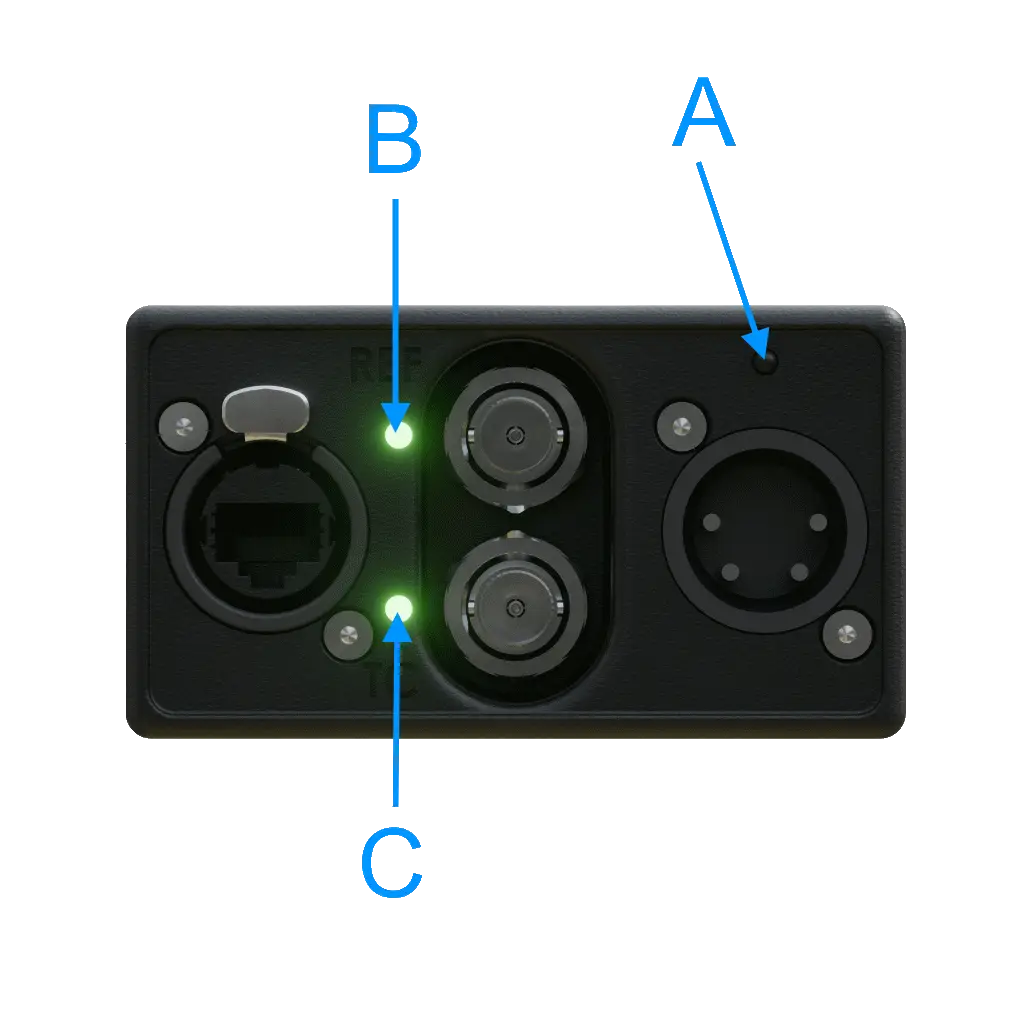
| # | Label | Colour | Reports |
|---|---|---|---|
| A | Power LED | 🔴 red | Boot, normal operation, Ethernet link status |
| B | Ref LED | 🟢 green | External genlock (Black Burst / Tri Level) lock |
| C | Timecode LED | 🟢 green | Timecode input detection |
Power LED
Red when active, off (⚫) when no power.
| Pattern | Sequence (≈1.5 s) | Cadence | Meaning |
|---|---|---|---|
| Off | ⚫⚫⚫⚫⚫⚫⚫⚫⚫⚫ | — | No power |
| Fast blink | 🔴⚫🔴⚫🔴⚫🔴⚫🔴⚫ | 10 Hz | Booting — firmware initialising, wait ~1 s |
| Slow blink (heartbeat) | 🔴🔴⚫⚫🔴🔴⚫⚫🔴🔴 | 1 Hz | Normal operation, Ethernet link up |
| Double-flash + long pause | 🔴⚫🔴⚫⚫⚫🔴⚫🔴⚫ | 80·80·80·400 ms, repeating | No Ethernet link — check cable / switch |
| Fast alternating with the other LEDs | 🔴⚫🔴⚫🔴⚫🔴⚫🔴⚫ | 8 Hz, 5 s window | Identify triggered from the Discovery tool — physically locating this unit |
Ref LED
| Pattern | Sequence (≈1.5 s) | Meaning |
|---|---|---|
| ON, steady | 🟢🟢🟢🟢🟢🟢🟢🟢🟢🟢 | External sync detected (Black Burst or Tri Level genlock locked) |
| OFF | ⚫⚫⚫⚫⚫⚫⚫⚫⚫⚫ | No genlock reference |
| Double-flash + long pause | 🟢⚫🟢⚫⚫⚫🟢⚫🟢⚫ | Lens box not responding — check internal connection |
| Fast alternating | 🟢⚫🟢⚫🟢⚫🟢⚫🟢⚫ | Identify in progress |
Timecode LED
| Pattern | Sequence (≈1.5 s) | Meaning |
|---|---|---|
| ON, steady | 🟢🟢🟢🟢🟢🟢🟢🟢🟢🟢 | Timecode signal detected on the BNC input |
| OFF | ⚫⚫⚫⚫⚫⚫⚫⚫⚫⚫ | No timecode input |
| Double-flash + long pause | 🟢⚫🟢⚫⚫⚫🟢⚫🟢⚫ | Lens box not responding — check internal connection |
| Fast alternating | 🟢⚫🟢⚫🟢⚫🟢⚫🟢⚫ | Identify in progress |
Tip
Ref and Timecode LEDs share the same alarm and identify patterns as the Power LED, so an alarm or identify event lights up the whole panel coherently.