Kuper source
The Kuper source receives the axis stream of a Kuper motion control system or a Ravensclaw Talon or Nano remote head over the network (UDP, port 9100 by default). Each axis is published as a 1D motion1 channel that any rig field can bind to, and the axes carrying zoom and focus can drive the lens.
What it publishes
| Channel | What it is |
|---|---|
kuper/CH1 … kuper/CH16 |
One channel per axis, in the order the stream sends them. Value = raw × scale + offset. |
kuper/fiz |
Focus, iris and zoom from the axes you map on the card, for the Lens page. |
With the Talon head preset (the default): CH1 is pan and CH2 tilt in degrees, CH3 zoom and CH4 focus from 0 to 1, and zoom and focus feed kuper/fiz.
Setting up the stream
The Kuper / Ravensclaw systems send their axes on a serial line (115200 baud, 8N1). RigFX receives them over the network: use the system's own UDP output where it has one, or a serial-to-IP gateway (a Moxa NPort, for example) set to send UDP.
- Send the stream as UDP to the IP address of RigFX and the port set on the card (9100 by default).
- In the RigFX web app, open Source in the sidebar and, on the Kuper Source card, turn Enable on. The status turns to Connected and the line rate appears (about 120 lines per second from a Talon).
- Pick the Preset14 of your head and click Apply.
Source card
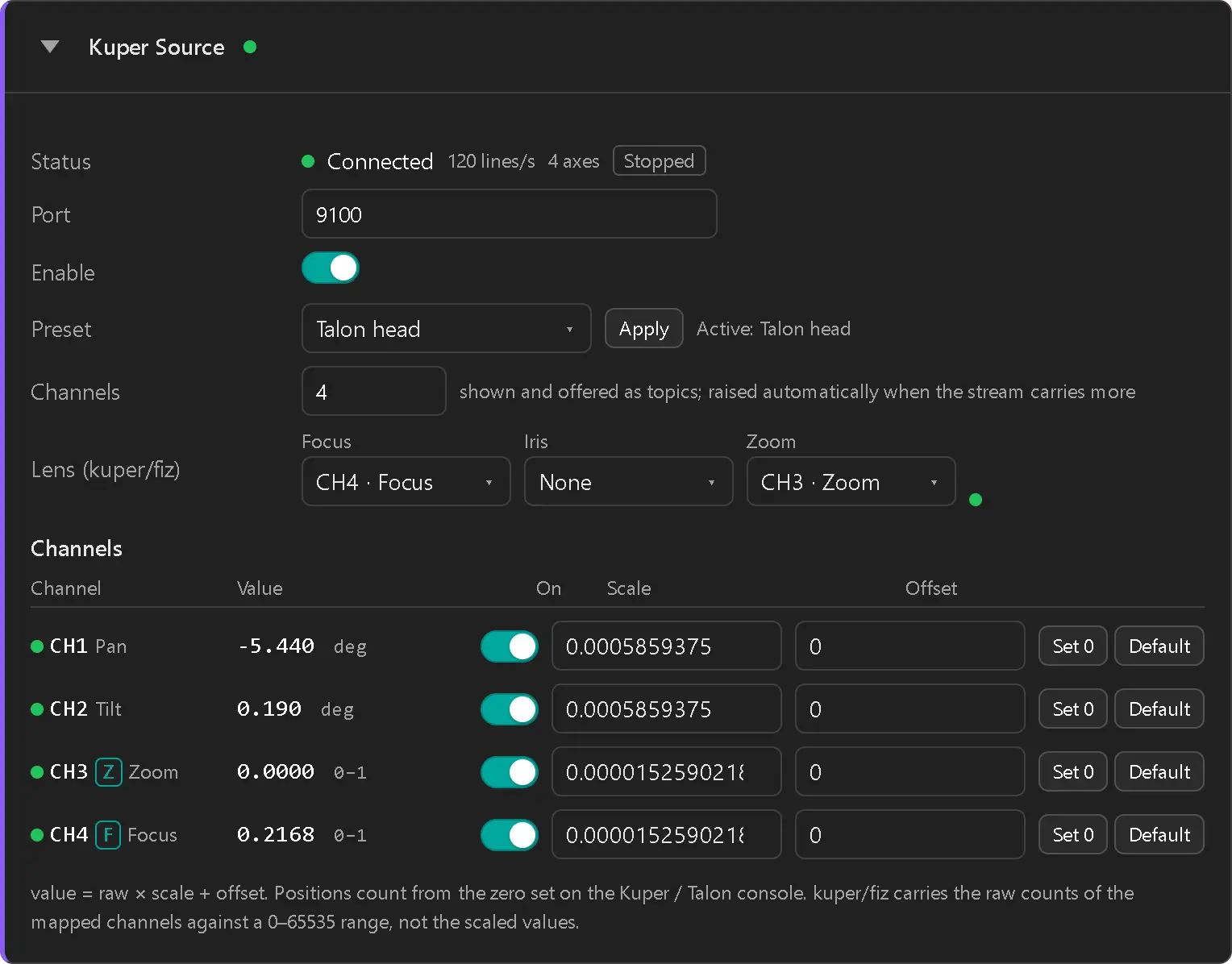
| Field | What it does |
|---|---|
| Status | LED + label (see Status states), the number of lines received per second and of axes in them, Rolling or Stopped, and how many lines were rejected because they were not Kuper data. Rolling means the move is recording or playing back on the console; it says nothing about whether the axes are moving. |
| Port | UDP port RigFX listens on (1–65535, default 9100). |
| Enable | Turns the source on and off. The source is off on a new unit. |
| Preset | Talon head, Nano head or Raw counts. Apply writes the preset's scales and lens mapping and resets every offset to 0. Active names the preset the current scales and lens mapping match. |
| Channels | How many axes the card shows and offers for binding (1–16, default 4). It rises by itself when the stream carries more axes. |
| Lens (kuper/fiz) | Which axis (CH1 to CH16, or None) drives Focus, Iris and Zoom. |
Then one row per axis:
| Column | What it does |
|---|---|
| LED | Green when the axis is receiving, amber when it is enabled but has had no data for half a second, off when disabled. An F, I or Z tag shows an axis that feeds the lens. |
| Channel | CH1 to CH16, with the preset's name for it (Pan, Tilt, Zoom, Focus). |
| Value | Live value: raw × scale + offset. |
| On | Enables the axis. A disabled axis is not published. |
| Scale, Offset | Converts the raw counts to the unit you want. |
| Set 0 | Sets the offset so the current value reads 0. |
| Default | Restores the axis's default (Talon head) scale and offset. |
Presets
| Preset | Pan, tilt | Zoom, focus | Lens mapping |
|---|---|---|---|
| Talon head | CH1, CH2: 614,400 counts per turn → degrees | CH3, CH4: 0–65535 → 0 to 1 | Zoom CH3, Focus CH4 |
| Nano head | CH1, CH2: 785.512 counts per degree → degrees | CH3, CH4: 0–65535 → 0 to 1 | Zoom CH3, Focus CH4 |
| Raw counts | every axis in raw counts | — | nothing mapped |
Use Raw counts as a start for other Kuper axes (track, lift, boom…), then set each scale yourself. The Tripod + Nano head rig preset applies Nano head for you (Presets).
Pan and tilt count from the zero set on the Kuper / Talon console, so a RigFX Set 0 is only needed to move that zero.
Lens from the stream
kuper/fiz carries the raw counts of the mapped axes against a fixed 0 to 65535 range; the axis scale does not apply to it. With a Talon or Nano head nothing else is needed: choose kuper/fiz as the FIZ5 source on the Lens page.
Status states
| LED | Label | Meaning |
|---|---|---|
| Off | Disabled | The Enable toggle is off. |
| Amber | No Data | Enabled, but no line arrived in the last half second. Check the destination IP and port of the stream, and the network. |
| Green | Connected | Lines are arriving. An axis missing from the lines still shows amber on its own row. |
Troubleshooting
Status stays at No Data
- Check that the stream goes to the IP address of RigFX and to the port shown on the card.
- If rejected counts up, the data on that port is not a Kuper axis stream, or something else sends to that port.
Pan or tilt turns the wrong way in the 3D view
- On the Rig page, toggle Negate on that field's binding.
Angles are off by a large factor
- The preset does not match the head: apply Talon head or Nano head to match the head you use.