Filmotechnic source
The Filmotechnic source receives the data of a Filmotechnic interface box over the network (UDP, port 9000 by default): the Technoscope crane, the Flight Head remote head and seven encoder inputs. Each value is published as a 1D motion1 channel that any rig field can bind to, and up to three encoder inputs can be mapped to focus, iris and zoom.
What it publishes
| Channel | What it is | Unit (default scale) |
|---|---|---|
filmotechnic/FHP |
Flight Head pan | degrees |
filmotechnic/FHT |
Flight Head tilt | degrees |
filmotechnic/FHR |
Flight Head roll | degrees |
filmotechnic/TSP |
Technoscope pan | degrees |
filmotechnic/TST |
Technoscope tilt | degrees |
filmotechnic/TSL |
Technoscope reach, from the crane's pivot to the nose | metres |
filmotechnic/CH1, CH2 |
Encoder inputs 1 and 2 (two-axis damper by default) | degrees |
filmotechnic/CH3 … CH7 |
Encoder inputs 3 to 7 | encoder ticks |
filmotechnic/fiz |
Focus, iris and zoom from the encoder inputs you map on the card | FIZ, for the Lens page |
Bind the channels on the Rig page, or load a Technoscope preset that binds them all.
Setting up the Filmotechnic box
- Connect the box to the same network as RigFX (see Hardware → Network).
- In the box settings, send the data over Ethernet UDP to the IP address of RigFX and the port set on the card (9000 by default).
- In the RigFX web app, open Source in the sidebar and, on the Filmotechnic Source card, turn Enable on. The status turns to Connected and the packet rate appears.
Source card
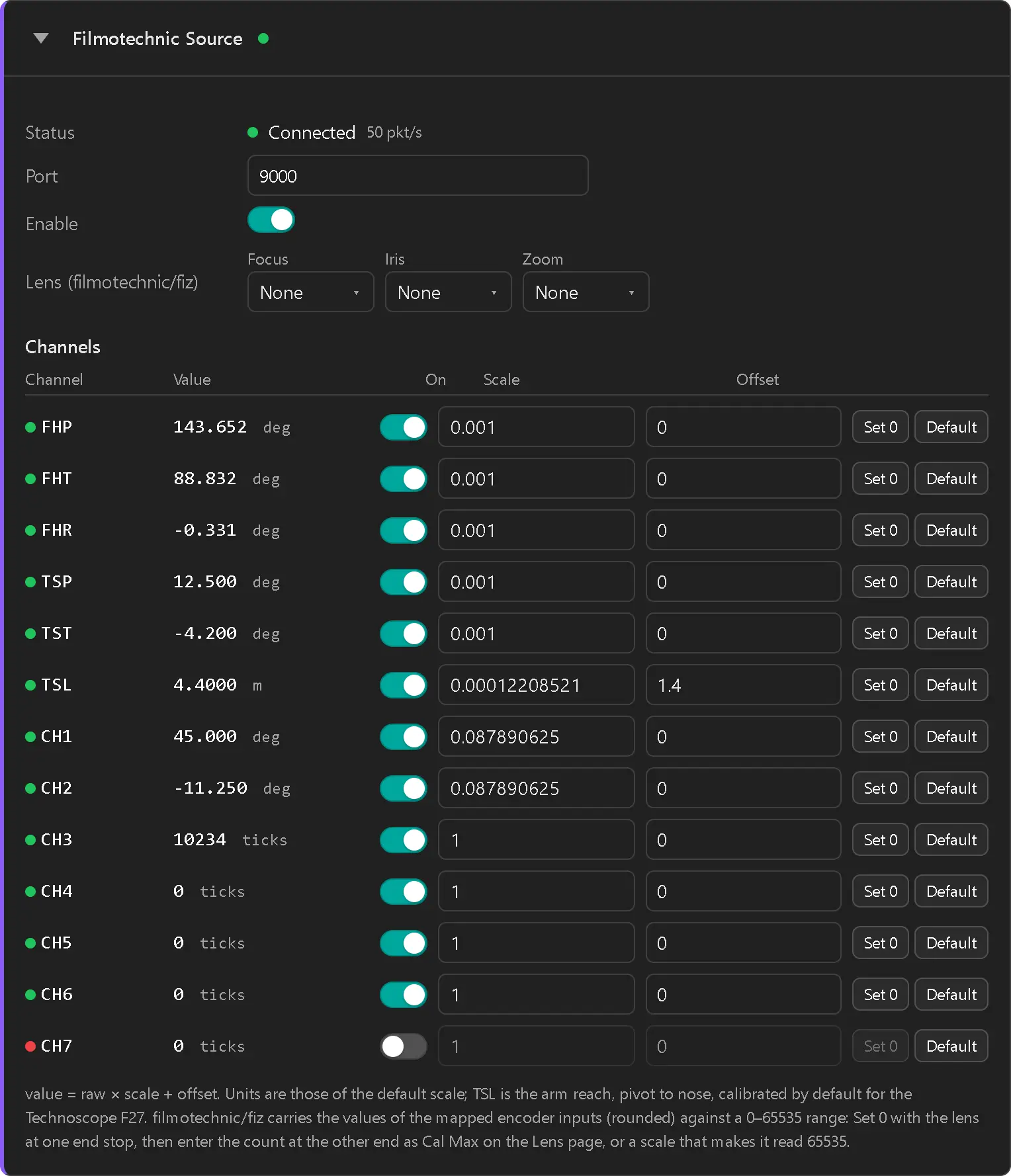
| Field | What it does |
|---|---|
| Status | LED + label (see Status states), the number of packets received per second, and how many datagrams were rejected because they were not Filmotechnic data. |
| Port | UDP port RigFX listens on (1–65535, default 9000). Must match the box's output port. |
| Enable | Turns the source on and off. The source is off on a new unit. |
| Lens (filmotechnic/fiz) | Which encoder input (CH1 to CH7, or None) drives Focus, Iris and Zoom. Nothing is mapped by default. See Lens from the encoder inputs. |
Then one row per channel:
| Column | What it does |
|---|---|
| LED | Green when the channel is receiving, amber when it is enabled but has had no data for half a second, off when disabled. An F, I or Z tag shows a channel that feeds the lens. |
| Channel | The channel name. Hover it for its description. |
| Value | Live value: raw × scale + offset. |
| On | Enables the channel. A disabled channel is not published. |
| Scale, Offset | Converts the box's raw value to the unit you want. The defaults give the units of the table above. |
| Set 0 | Sets the offset so the current value reads 0. |
| Default | Restores the channel's default scale and offset. |
Default calibration
- Head and crane angles (FHP, FHT, FHR, TSP, TST): the box sends thousandths of a degree, scale 0.001 → degrees.
- TSL: scale 1/8191 m per count, offset 1.40 m, so the value is the reach of a Technoscope F27 in metres, 1.40 m fully retracted. Loading the Technoscope F17 + Colibri Preset14 sets the offset to 1.32 m, the F17's retracted reach. Don't use Set 0 on TSL: the reach would read 0 m and the arm length in the rig would be wrong. Use Default or load the preset again.
- CH1, CH2 (two-axis damper): 4096 ticks per turn, scale 360/4096 → degrees.
- CH3 to CH7: raw ticks (scale 1).
Encoder inputs count from power-up
The seven encoder inputs are incremental: they count from wherever the axis was when the box was switched on. After each power cycle of the box, bring the axis to its reference (damper level, lens at its end stop) and click Set 0 on the channel.
Lens from the encoder inputs
- Pick the encoder input of each lens axis under Lens (filmotechnic/fiz): for example Focus → CH3, Zoom → CH4.
- Turn the lens ring to one end stop and click Set 0 on that channel.
- Turn it to the other end stop and note the value. Either enter it as Cal Max on the Lens page (Cal Min 0), or set a scale that makes the full travel read 65535.
- On the Lens page, choose
filmotechnic/fizas the FIZ5 source.
filmotechnic/fiz carries the channel values (after scale and offset), against a 0 to 65535 range.
Status states
| LED | Label | Meaning |
|---|---|---|
| Off | Disabled | The Enable toggle is off. |
| Amber | No Data | Enabled, but no Filmotechnic packet arrived in the last half second. Check the box's destination IP and port, and the network. |
| Green | Connected | Packets are arriving. A channel missing from the packets still shows amber on its own row. |
Troubleshooting
Status stays at No Data
- Check that the box sends UDP to the IP address of RigFX and to the port shown on the card.
- Check that RigFX and the box are on the same subnet.
- If rejected counts up, something else is sending to that port: change the port on both sides.
A head or crane axis turns the wrong way in the 3D view
- On the Rig page, toggle Negate on that field's binding. Don't use a negative scale for this.
The damper or lens values jump after the box was switched off and on
- The encoder inputs restarted from 0. Zero them again with Set 0 (see Encoder inputs count from power-up).