Lens pipeline
Lens data has been a long-running topic in virtual production. FIZ (raw Focus / Iris / Zoom ring positions) tells you how much each ring has turned but carries no optical information about the lens. To produce usable optical parameters (focal length, focus distance, distortion, entrance pupil, projection offset) FIZ has to be combined with a lens calibration file — the question is where that combination happens.
Every pipeline has the same three blocks split across two worlds:
- Tracking world — the lens and the tracking device (RigFX).
- Render world — the render engine.
The only thing that changes between pipelines is where the lens file lives, which in turn dictates what travels over the wire.
Pipeline 1 — Lens file on the render engine
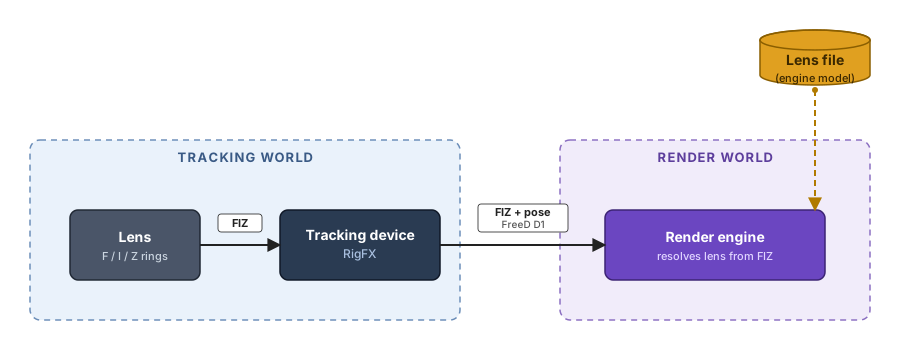
Raw FIZ flows through RigFX to the render engine, which owns the calibration and resolves the optical parameters itself. Use this when your render engine already has a lens model and you just want synchronised encoder values.
RigFX setup — Lens panel in FIZ Source + Lens File mode with the lens slot left empty, output destination set to FreeD D1.
Pipeline 2 — Lens file on the tracking device
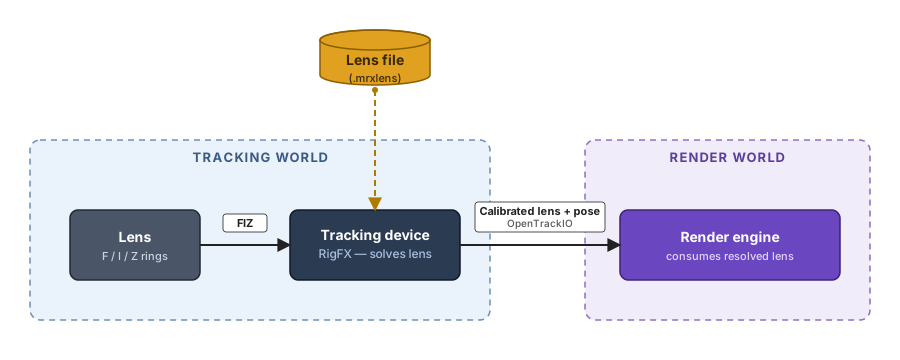
RigFX combines FIZ with an in-box .mrxlens calibration file, solves the lens on-device, and ships fully resolved optical parameters over the wire. The render engine consumes them as-is — no lens file on the target side.
RigFX setup — Lens panel in FIZ Source + Lens File mode with a .mrxlens slot selected, output destination set to OpenTrackIO.
Pipeline 3 — Lens file on the lens itself
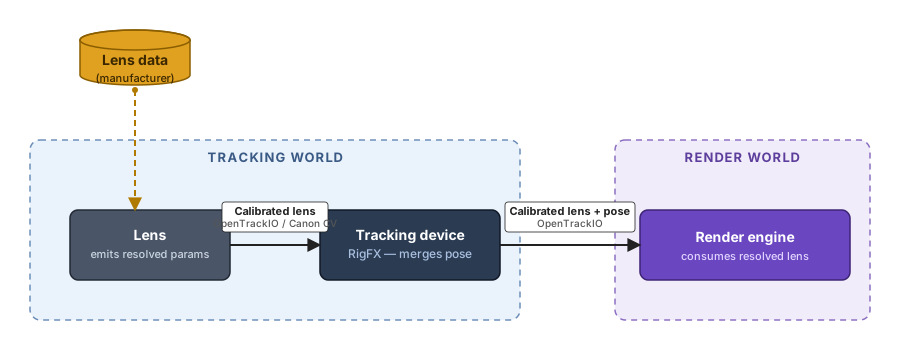
The lens itself (or an upstream tool tightly coupled to it — Sony FR7 over OpenTrackIO, Canon CV-capable camera) already emits resolved lens parameters. RigFX accepts them on the input side, merges them with the rig pose, and forwards a single OpenTrackIO stream.
RigFX setup — Lens panel in Lens Source mode pointing at the upstream source, output destination set to OpenTrackIO.
Output protocols
RigFX can emit either of two protocols on its output. Both carry pose, both are sent one frame per genlock pulse — they differ in what else they carry, and in the units and sign conventions they use.
| OpenTrackIO | FreeD D1 | |
|---|---|---|
| Format | JSON over UDP | Compact binary over UDP |
| Cadence | One frame per genlock pulse | One packet per genlock pulse |
| Pose | Position + rotation | Position + rotation |
| Lens information | Full resolved lens model — focal length, focus distance, f-stop, entrance pupil, projection offset, distortion | Raw zoom + focus encoder values only — no optical resolve |
| Static camera info | Yes (sensor, camera ID, static metadata) | Camera ID only |
| Translation units | Metres | Millimetres |
| Rotation units | Degrees | Degrees |
| Pan sign | Positive = left (CCW from +Z) | Positive = right (CW from +Z) |
| Adoption | Modern standard, adopted by up-to-date render engines — spec: https://www.opentrackio.org/ | Legacy standard, implemented by virtually every render engine |
Tip
If your render engine supports both, prefer OpenTrackIO — it carries the full lens model, so RigFX can resolve the lens once on-device (Pipelines 2 and 3) rather than relying on a lens model living downstream.
Axis & rotation reference
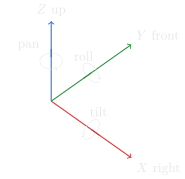
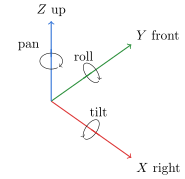
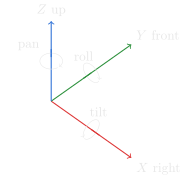
Both protocols share the same right-handed frame — X right, Y front, Z up, rotations in degrees. Tilt and roll match between protocols. Only pan flips sign: positive left in OpenTrackIO, positive right in FreeD. RigFX handles the inversion internally.
OpenTrackIO — +pan = left (CCW from +Z)
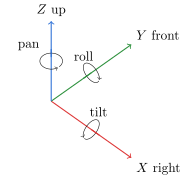
FreeD D1 — +pan = right (CW from +Z)
| Axis | Direction | Rotation around it | Positive direction |
|---|---|---|---|
| X (red) | Right | Tilt | Nose up |
| Y (green) | Front — where the camera looks | Roll | Clockwise from the camera's point of view |
| Z (blue) | Up | Pan | Left in OpenTrackIO (CCW from +Z) / right in FreeD (CW from +Z) |