Source Cartoni
The Cartoni source reads up to four absolute encoder channels wired through the 4 × Lemo 7-pin connectors on the Cartoni edition back panel (see Hardware → Box overview). Each channel is a synchronous bit-bang stream from a Cartoni encoder (e-Series heads, e-Jibo, encoded tripods) and surfaces as a 1D motion channel that any rig field can bind to.
For end-to-end hardware tutorials, see the eJibo + FR7 or eJibo + fluid head setups.
What it publishes
| Channel type | Source channels | Where to bind it |
|---|---|---|
| 1D motion | cartoni/1 .. cartoni/4 |
One field of a Pose3D node on the Rig page — typically pan or tilt of a mechanical axis |
Each channel value is raw + offset, where raw is what the encoder reports and offset is the per-channel calibration set by Set 0 or edited manually.
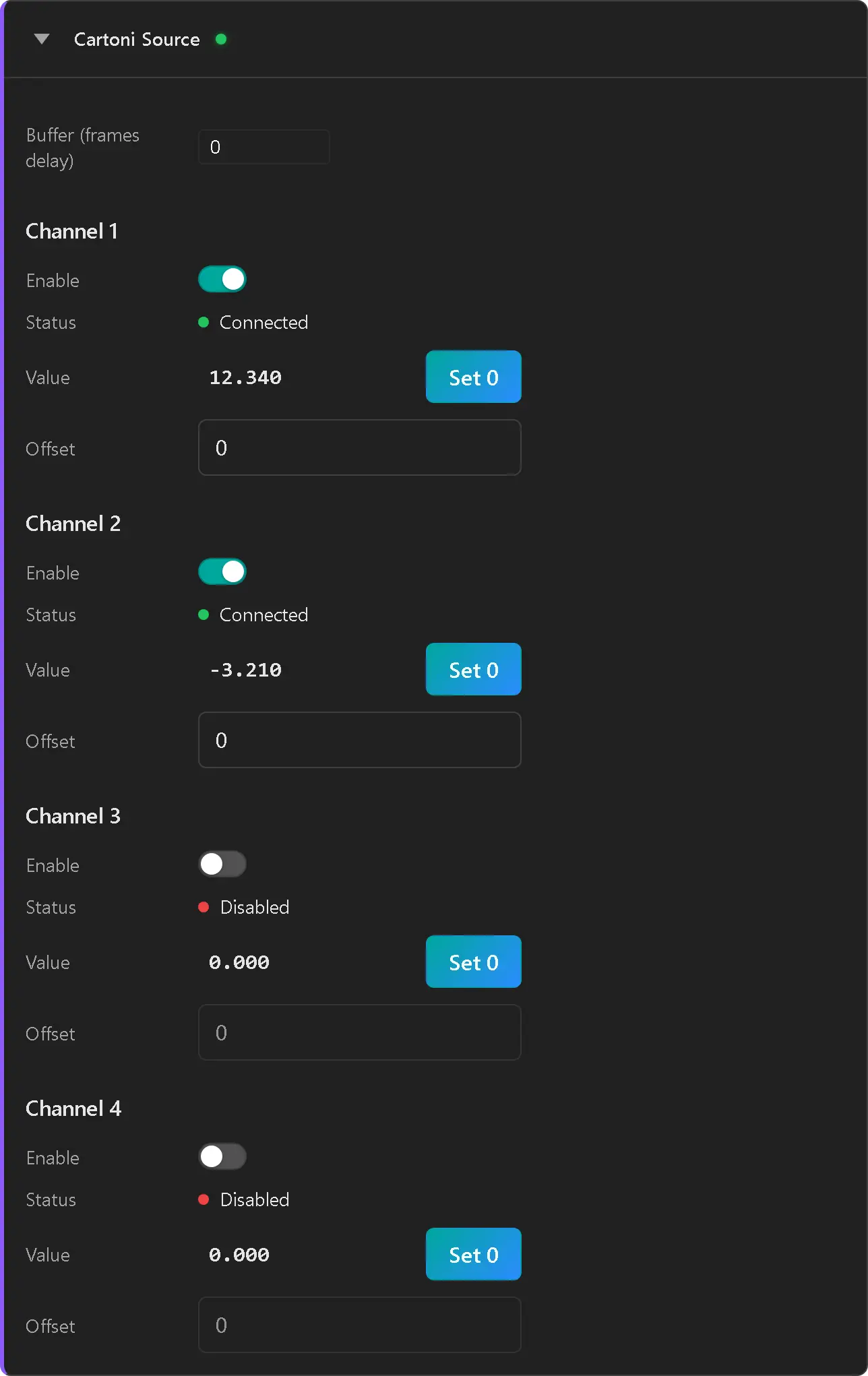
Source card
Global
| Field | What it does |
|---|---|
| Buffer (frames delay) | How many genlock frames to delay Cartoni values by before publishing. Range 0–10. Use this to time-align Cartoni against a slower upstream source (e.g. an OpenTrackIO PTZ feed) so all bindings on a multi-segment rig land on the same physical frame. |
Per channel (1 to 4)
| Field | What it does |
|---|---|
| Enable | Toggles this channel on/off. RigFX only clocks data out of a channel if it's enabled. |
| Status | LED + label — see Status states below. |
| Value | Live raw + offset reading. Updates every genlock pulse. |
| Set 0 | Captures the current raw value into the offset so the displayed value snaps to 0. Disabled until the channel is enabled. |
| Offset | Manually editable float. Same field that Set 0 writes. Useful for entering a known mechanical offset without moving the rig. |
Channel-to-port mapping
The 4 Lemo 7-pin connectors on the back panel are labelled 1 to 4 and feed channels 1 to 4 of the source one-to-one. Bind any channel to any rig field — the channel is just a wire identity, not a fixed axis.
The typical convention for an e-Jibo + e-head setup is:
| Channel | Wired to | Bound to (rig) |
|---|---|---|
| 1 | Arm Pan encoder | Tripod node — Pan |
| 2 | Arm Tilt encoder | Tripod node — Tilt + Arm node — Tilt (opposite sign) |
| 3 | Head Pan encoder | Head node — Pan |
| 4 | Head Tilt encoder | Head node — Tilt |
See the eJibo + FR7 tutorial for a worked rig that uses only channels 1 and 2.
Status states
| LED | Label | Meaning |
|---|---|---|
| Off | Disabled | The Enable toggle is off. RigFX doesn't clock the channel. |
| Yellow | No Data | Enabled, but no encoder responded on the channel during the last frame. Either nothing is wired into the corresponding Lemo port, or the encoder isn't powered / the cable is bad. |
| Green | Connected | Enabled and a valid encoder frame (with passing CRC) was decoded. |
When the card is folded, the header shows a green LED if every enabled channel is connected, and a warning icon if any enabled channel is in No Data.
Calibration workflow
- Mount the encoders on the rig and wire each cable to the corresponding Lemo port.
- Enable only the channels you have wired. Leave the others disabled — they'd otherwise show No Data.
- Bring each axis to its reference position (e.g. arm parallel to the studio's main direction, head level).
- Lock the axis mechanically if you can — the encoder must not move while you click Set 0.
- Click Set 0 on the channel. The displayed Value snaps to 0 and the corresponding Offset field shows the captured calibration.
- Bind the channel to a rig field on the Rig page. If the sign is wrong (panning right makes the camera turn left in the 3D viewport), flip the Negate flag on the binding — don't change the encoder offset.
The offset persists across reboots. You only need to re-zero when the encoder is physically removed and remounted, or when you re-align the studio reference.
Troubleshooting
An enabled channel stays at No Data
- Confirm the cable is plugged into the labelled Lemo port matching the channel number on the card (port 1 → channel 1, etc.).
- Try swapping the cable with a known-good channel to isolate cable vs encoder.
Movement direction is inverted
- Don't fix this with a negative Offset — that moves zero but leaves the sign wrong. Bind the channel to its rig field, then toggle Negate on the binding (see Rig page).
Cartoni values arrive earlier than the OpenTrackIO / FreeD source on the same rig
- Increase the global Buffer (frames delay) by 1 and re-check. The Cartoni path has lower latency than the network sources, so a small buffer typically realigns them onto the same genlock frame.