Sync
The Sync panel chooses how RigFX clocks its pipeline.
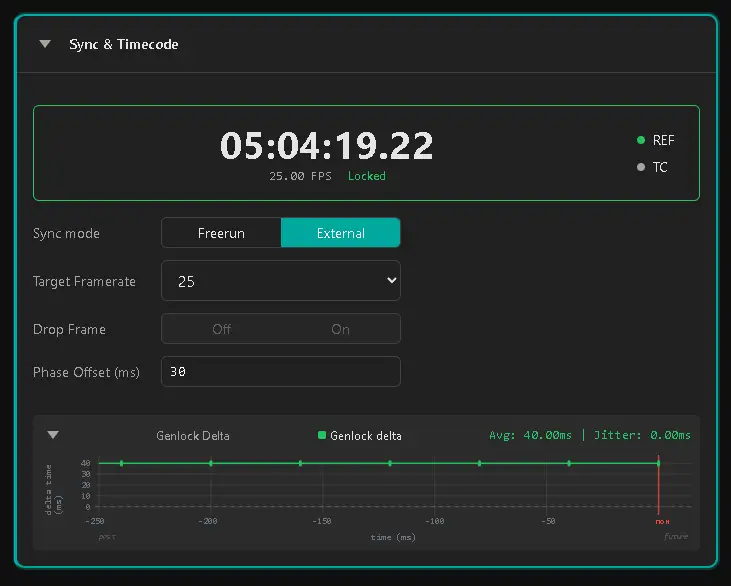
Sync mode
| Mode | Description |
|---|---|
| Freerun | RigFX drives itself off its internal clock at the configured framerate |
| External | RigFX locks every frame to the external ref signal or timecode signal |
Warning
In External mode, use only one of Ref or Timecode as the lock source. If you plug both, make sure they come from the same physical source — mismatched sources will drift over time.
Ref (genlock)
Supported framerates:
| 23.98 | 24 | 25 | 29.97 | 30 | 50 | 59.94 | 60 |
|---|---|---|---|---|---|---|---|
The unit auto-detects the format. Lock state is reported on this panel and on the Ref LED on the front panel — see LED indicators.
Timecode
The system detects SMPTE-12M LTC timecode on a BNC input.
Supported framerates:
| 23.98 | 24 | 25(50) | 29.97(59.94) (DF drop-frame or NDF non-drop-frame) | 30(60) |
|---|---|---|---|---|
Note
The parenthesised rates (50, 59.94, 60) are double-rate Target framerates that lock to the lower timecode rate. For example, with a 25 fps timecode input, you can set the Target framerate to 50 — the unit runs at twice the timecode rate, and each frame is internally numbered from 0 to framerate − 1.
Target framerate
The expected frame rate of the genlock signal (or, in Freerun mode, the rate RigFX runs at). The status line just below confirms the observed FPS — these two should match. If they don't, your reference signal is at a different rate.
In External mode, choosing the right Target framerate helps the signal lock to the right frequency quickly.
Lock status
When sync is locked, the status shows Locked with the actual measured framerate. A graph below shows the delta between 2 pulse arrival times. A flat line is good; visible jitter means you should check cabling or the upstream generator.
Drop-frame
A toggle switch sets drop-frame timecode behaviour (NTSC family — 29.97, 59.94).
Phase offset
Set the phase offset in ms. It defines how long the device waits after receiving the external genlock pulse before triggering its own internal genlock.
The phase offset must stay between 0 ms and one period (according to the selected framerate).
Physical side
The physical cabling and supported signal types (Black Burst, Tri Level) live on the Hardware → Genlock / Sync page.