Open Lens File Export
Choose Open Lens File export in CalibFX Lens:

Format Specifications
Open Lens File is formatted in JSON. The keys and their content are presented in the following:
Version
Int
The version of the file format. The current version is 2.
For example:
"Version": 2
LensName
String
The name of the calibration. This is specified by the user at export time.
For example:
"LensName": "CanonHJ14ex43"
SensorSizeMillimetre
Couple(Float, Float)
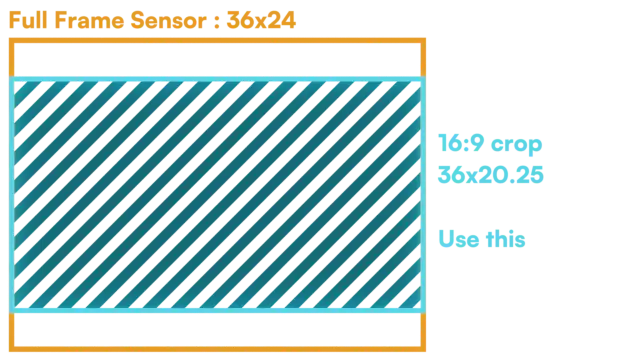
The effective sensor size. It doesn’t always correspond to the full sensor size announced by the camera manufacturer, but
rather to the exact area on it to which the image correspond.
For example if the manufacturer only indicates the camera sensor is "full-frame", the sensorSizeMillimetre may be 36mm x 20.25mm in the lens file:
For example, if the camera has a 1/1.8'' sensor:
"SensorSizeMillimetre": [
    9.59,
    5.39
]
CalibrationResolution
Couple(Int, Int)
The pixel resolution at which the calibration was done. The other parameters expressed in pixels depend on this resolution
and will have to be scaled to use with another resolution.
resolution adjustment
For example, if the calibration was done in 1920x1080 but you want to use UHD in production (2x the resolution on each side),
you will have to multiply the FocalLengthPix, Cx and Cy by 2.
Distortion, metric focal length, entrance pupil and focus distance are resolution-independant.
For example, if the image is in FHD:
"CalibrationResolution": [
    1920,
    1080
]
EncoderBounds
Dict{"µ": {"µMin":Int, "µMax":Int}}, where µ in [Focus, Zoom, Iris]
The minimum and maximum of the encoders at calibration time. This is used to normalize the values received from the tracking system to the interval [|0,1|].
For all other parameters afterward, encoder values are expected in this [|0,1|] range.
For example, if the lens encoders use 16bit resolution, the EncoderBounds could look like this:
"EncoderBounds": {
    "Focus": {
        "FocusMin": 0,
        "FocusMax": 65535
    },
    "Zoom": {
        "ZoomMin": 0,
        "ZoomMax": 65535
    },
    "Iris": {
        "IrisMin": 0,
        "IrisMax": 65535
    }
}
PinholeIntrinsics
Parameters found in the camera matrix. You can build a OpenCV-compatible projection matrix using:
CenterShiftPix
Dict{"Cx": Float, "Cy": Float}
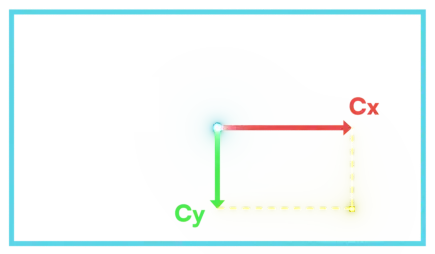
Position of the optical center in the image. Corresponds to the intersection of the image plane and the optical axis. Zoom and distortion are centered on this point.
- Cx denotes the horizontal centershift, with origin at the center of the image and positive toward the right.
- Cy denotes the vertical centershift, with origin at the center of the image and positive toward the bottom.
For example:
"CenterShiftPix": {
    "Cx": -16.77,
    "Cy": 4.46
}
FocalLengthPix
Table(Focus, Zoom) → Float
Focal length expressed in pixels as is the standard in OpenCV. This means the conversion from FOV to focal length uses the
pixel image width rather than the millimeter sensor width here.
For example:
"FocalLengthPix": {
    "0.0": {
        "0.0": 1016.4987023805112,
        "0.5": 3247.3526889774835,
        "1.0": 13241.802168882485
    },
    "1.0": {
        "0.0": 1015.938929287718,
        "0.5": 3458.7546880646787,
        "1.0": 16901.487582681453
    }
}
Note
see Appendix at the end for the explained data structure of a Table(Focus, Zoom) → Float
FocalLengthMillimetre
Table(Focus, Zoom) → float
Focal length expressed in millimetres as is the standard in lens manufacturing and cinematographer talk.
For example:
"FocalLengthMillimetre": {
    "0.0": {
        "0.0": 5.077199247827657,
        "0.5": 16.219850149632325,
        "1.0": 66.14004312478282
    },
    "1.0": {
        "0.0": 5.07440329784855,
        "0.5": 17.275759092989723,
        "1.0": 84.41940933224745
    }
}
HFOV
Table(Focus, Zoom) → float
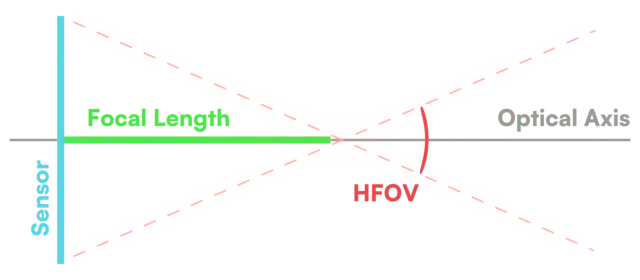
Horizontal Field of View, given in Degrees. this parameter has the advantage of being sensor and resolution independent.
It directly describes the trigonometric transform required by the perspective projection.
For example:
"HFOV": {
    "0.0": {
        "0.0": 86.72526380449864,
        "0.5": 32.93803744137152,
        "1.0": 8.29311373823318
    },
    "1.0": {
        "0.0": 86.75677352152543,
        "0.5": 31.02468520804141,
        "1.0": 6.501784044272465
    }
}
Distortion
Given (X, Y) the position of a point in pixels, with origin at the top left of the image, and (w,h) the width and height of the image in pixels, let (x, y) the centered width-normalized coordinates be defined as
The distorted position is computed as follows using the Brown-Conrady model:
K1
Table(Focus, Zoom) → float
\(K_1\) distortion coefficient of the Brown-Conrady model using the Width-Normalized normalization.
For example:
"K1": {
    "0.0": {
        "0.0": 0.4493403119405053,
        "0.5": -0.12797979767301337,
        "1.0": -0.05395755952235473
    },
    "1.0": {
        "0.0": 0.42676349957711657,
        "0.5": -0.1514092698420919,
        "1.0": -0.05877545658765103
    }
}
K2
Table(Focus, Zoom) → float
\(K_2\) distortion coefficient of the Brown-Conrady model using the Width-Normalized normalization.
For example:
"K2": {
    "0.0": {
        "0.0": -0.8048348076736884,
        "0.5": 0.04229545301428597,
        "1.0": -0.047866911237423426
    },
    "1.0": {
        "0.0": -0.8040961952293872,
        "0.5": 0.06197160716588901,
        "1.0": -0.011569982295876857
    }
}
K3
Table(Focus, Zoom) → float
\(K_3\) distortion coefficient of the Brown-Conrady model using the Width-Normalized normalization.
For example:
"K3": {
    "0.0": {
        "0.0": 0.0,
        "0.5": 0.0,
        "1.0": 0.0
    },
    "1.0": {
        "0.0": 0.0,
        "0.5": 0.0,
        "1.0": 0.0
    }
}
P1
Table(Focus, Zoom) → float
\(P_1\) distortion coefficient of the Brown-Conrady model using the Width-Normalized normalization.
For example:
"P1": {
    "0.0": {
        "0.0": 0.0,
        "0.5": 0.0,
        "1.0": 0.0
    },
    "1.0": {
        "0.0": 0.0,
        "0.5": 0.0,
        "1.0": 0.0
    }
}
P2
Table(Focus, Zoom) → float
\(P_2\) distortion coefficient of the Brown-Conrady model using the Width-Normalized normalization.
For example:
"P2": {
    "0.0": {
        "0.0": 0.0,
        "0.5": 0.0,
        "1.0": 0.0
    },
    "1.0": {
        "0.0": 0.0,
        "0.5": 0.0,
        "1.0": 0.0
    }
}
Undistortion
In mathematics inverting a mapping is a hard problem, and while there are relatively simple algorithms to numerically estimate the inversion, they may not be cheap enough for real-time applications. This issue also applies to the Brown-Conrady model. Since we also compute the inverted coefficients in CalibFX Lens, which we call Undistortion Coefficients, they are given in the lens file alongside the ones used for distortion.
x, y, r are defined like for distortion coefficients, using a width normalization.
The undistorted position is computed as follows using the Brown-Conrady model:
The Width-Normalized undistortion coefficients tables are structured similarly to Width-Normalized distortion.
OpencvDistortion
The distortion coefficients given in OpenCV normalization.
Given (X, Y) the position of a point in pixels, with origin at the top left of the image, (w,h) the width and height of the image in pixels, and \(f_{px}\) the focal length in pixels, let (x^{ocv}, y^{ocv}) the centered width-normalized coordinates be defined as
The distorted position is computed as follows using the Brown-Conrady model:
The OpenCV distortion coefficients tables are structured similarly to Width-Normalized distortion.
Warning
OpenCV distortion coefficients do not interpolate well over a focal length change for large focal lengths. Prefer using the width-normalized coefficients when sampling the look up table from the lens file.
These OpenCV coefficients tables should be used mostly for prototyping and testing.
EntrancePupilDistanceMetre
Table(Focus, Zoom) → float
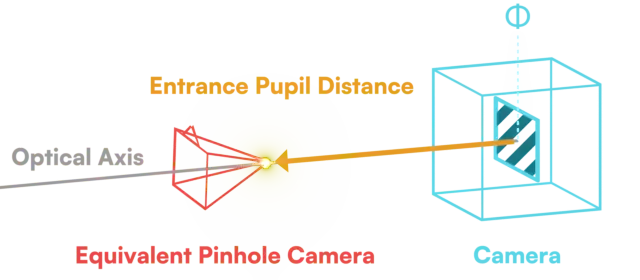
Distance from the sensor plane along the optical axis to the equivalent pinhole camera. Positive means forward. Projection should be done from this point in the render engine. It is given in metres.
For example:
"EntrancePupilDistanceMetre": {
    "0.0": {
        "0.0": 0.2813912110936959,
        "0.5": 0.26324719766224336,
        "1.0": 0.20492879571505196
    },
    "1.0": {
        "0.0": 0.2813912110936959,
        "0.5": 0.26324719766224336,
        "1.0": 0.20492879571505196
    }
}
FocusDistanceMetre
Table(Focus) → float
Distance from the sensor plane along the optical axis forward where the plane in perfect focus is located.
For example:
"FocusDistanceMetre": {
    "0.0": 50.0,
    "0.5": 1.2,
    "1.0": 0.3
}
Warning
Before using it for rendering, you need to subtract the Entrance Pupil Distance to get the focus distance from the point of projection.
ApertureFStop
Table(Iris) → float
Describes how much light reaches the sensor and how long the depth of field should be.
The most common protocol in virtual production, FreeD (d1), does not natively support iris encoding,
so this field might often be empty.
There is no notion of complete closure of the iris in the lens file, it will just be a very large f-stop value.
For example:
"ApertureFStop": {
    "0.0": 100.0,
    "0.5": 5.6
    "1.0": 1.8
}
Appendix : Table Formats
Table(x)
"ParameterName": {
    "encoder x 0": value 0,
    "encoder x 1": value 1,
    "encoder x 2": value 2,
    ...
}
For example, x could designate the focus encoder value, or the iris encoder value. It is normalized in [|0, 1|].
Table(x,y)
"ParameterName": {
    "encoder x 0": {
        "encoder y 0": value (0,0),
        "encoder y 1": value (0,1),
        ...
    },
    "encoder x 1": {
        "encoder y 0": value (1,0),
        "encoder y 1": value (1,1),
        ...
    },
    ...
}
For example, x could designate the focus encoder value, and y the zoom encoder value. They are both normalized in [|0, 1|].
Data is given on a rectilinear grid, so we recommend using a bilinear or bicubic interpolation scheme for simplicity of implementation and computational speed.